eclipse-redmine 일감 연동하기

 Eclipse 에서 제공하는 여러가지 plug-in 들을 사용하면 레드마인과의 일감 연동을 할 수 있다.

 이를 이용하면 eclipse 에서도 redmine 으로 일감 보고/가져오기 등의 기능을 수행할 수 있어 매우 편리하다.

 먼저 redmine 과 eclipse 가 연동된 필자의 작업환경을 보자.
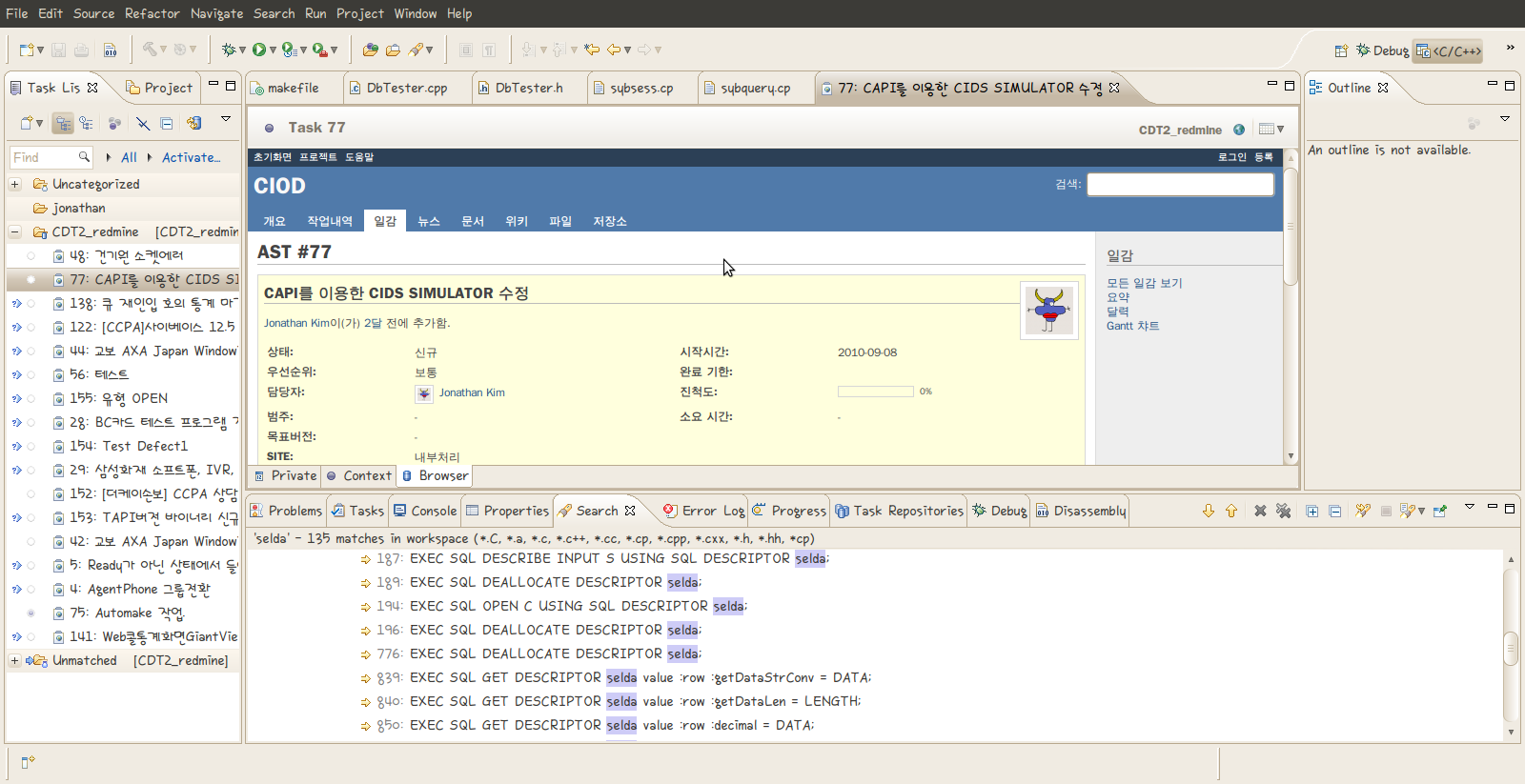

 먼저 가장 기본이 되는 내용은 Redmine Wiki 의 내용이다. 지금 여기에 적는 내용 역시 redmine wiki 의 내용을 바탕으로 진행한 내용을 옮겨 적은것에 불과하다. 하다가 잘 모르는 내용이 있다면 wiki를 따라가자.

 eclipse 에서 redmine 과 연동하기 위해서는 Mylyn plug-in 이 필요하다.

 help -> Install New Software 에서 다음의 링크를 추가하도록 하자.

http://download.eclipse.org/tools/mylyn/update/incubator

 그러면 여러가지 Mylyn plug-in 들이 나오는데, 이중

 Mylyn connector: Web Templates(Advenced) 항목을 설치하도록 하자.

 하지만 필자의 경우 의존성 문제가 발생하였다. Mylyn Task List plug-in 이 필요하다는 것이었는데, 다음의 저장소 경로를 추가하여 Mylyn Task List plug-in 을 설치하여 문제를 해결할 수 있었다.

http://download.eclipse.org/tools/mylyn/update/e3.4/

 Mylyn Task List 와 Mylyn connector 를 설치하고 다음을 진행하자.

 설치가 완료되었다면 일감 설정을 해야한다. 즉, 어느 redmine 서버에서 어느 사용자의 일감을 가져올 것이지 설정하는 것이다.

 Eclipse 에서 다음의 View를 추가하도록 하자.

 Window -> Show view -> Other -> Task -> Task Repositories

 그러면 화면의 아래쪽에 TASK 저장소 window가 나타나게 되는데, 여기에서

마우스 우클릭 -> Add Repository..

를 선택하도록 하자.
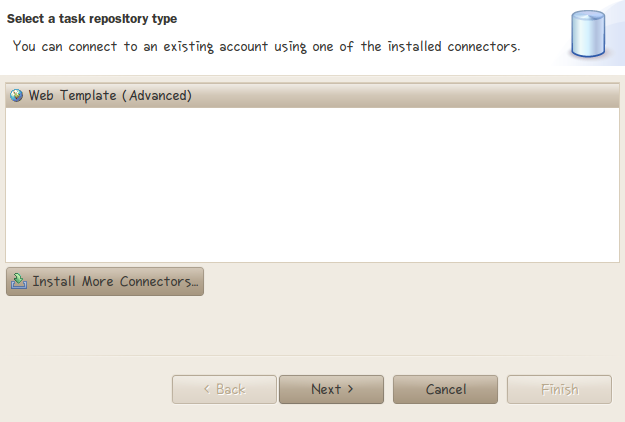

위와 같은 화면이 나오게 되는데, Web Template(Advanced)를 선택하고 Next를 클릭하자.

아래의 그림과 같이 내용을 채워넣자. 자세한 내용을 그림 아래를 참고하도록 하자.
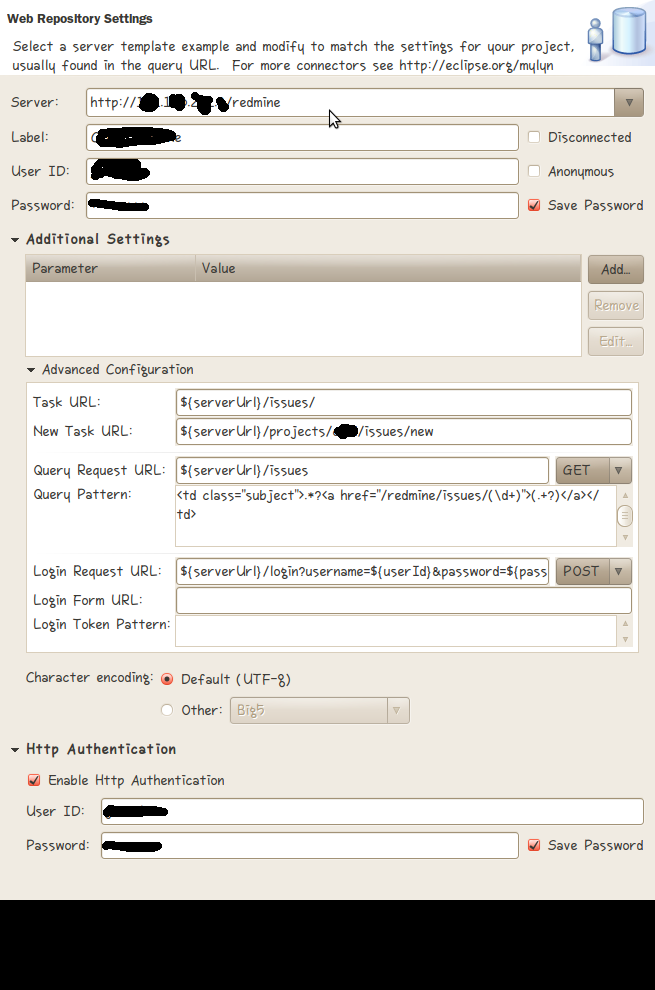
Server: http://www.redmine.org -- Replace it with the URL of your Redmine instance
Task URL: ${serverUrl}/issues/
New task URL: ${serverUrl}/projects/foo/issues/new -- Replace foo with the identifier of the project used for new tasks
Query request URL: ${serverUrl}/issues
Query pattern: <td class="subject">.*?<a href="/issues/(d+)">(.+?)</a></td>
Login request URL: ${serverUrl}/login?username=${userId}&password=${password}&authenticity_token=${loginToken} [POST]
Login Form URL: ${serverUrl}/login
Login Token Pattern: <input name="authenticity_token" type="hidden" value="(.+?)" />
위 박스 안의 내용은 Redmine wiki에서 발췌한 부분이다. 자세히 보면 Query patern 부분과 Server 부분에서 약간의 차이가 있는 것을 확인할 수 있다.

이는 필자의 redmine 은 Bitnami 를 이용하여 설치하였기 때문에 redmine의 URL 주소가 약간 틀려져서 그런 것인데, 만약 Bitnami를 설치하지 않았다면
redmine wiki의 내용을 따라가고, Bitnami를 이용하여 설치하였다면 필자의 설정을 참고하여 진행하면 될 것이다.

 여기까지 진행이 완료 되었다면 이제 Task List에 Ticket을 추가하는 것만 남았다.

 먼저 아래의 Window 를 추가하도록 하자.

 Window -> Show view -> other -> Tasks -> Task List

생성된 Task List window 에서

마우스 우클릭 -> New -> Query

를 진행하여 새로운 Ticket을 추가하자.

Select Repository 에서 조금전 생성한 저장소의 label 을 확인할 수 있을 것이다.

Next 를 진행하여 Ticket을 추가하자.

대부분의 설정을 Repository에서 가져오기 때문에 따로 수정할 부분이 없을 것이다.
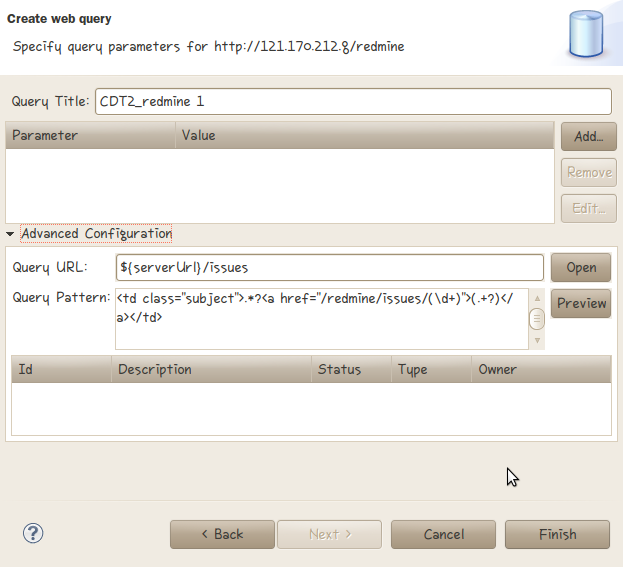
생성된 Ticket을 클릭하면 나에게 주어진 일감들을 확인할 수 있고, 이제 Eclispe에서도 일감의 생성/수정/삭제가 가능해 질 것이다.

참조 사이트
http://jabsiri.tistory.com/35
http://www.redmine.org/wiki/redmine/HowTo_Mylyn
http://blog.namgoos.com/93
우분투 한글폰트 설치 및 안티 앨리어싱 적용하기

새로운 폰트 적용하기

 우분투에서 새로운 한글 폰트를 적용/설치 하기 위해서는 아래의 디렉토리에 새로운 디렉토리를 생성하여 폰트를 넣으면 된다.

/usr/share/fonts/truetype

 그런 후 터미널에서 다음을 입력하면 된다.

# sudo -s
(root 권한이 필요하다..)
# fc-cache -f – v

————————————————————————————————————————————————————

안티 앨리어싱 적용하기

 처음 우분투를 사용하면 유독 한글 폰트에(ex. 은진낙서체) 대해서 글자가 뭉개지는 것을 확인할 수 있다.
 이는 우분투에서 안티 앨리어싱 설정을 끄도록 설정이 되어있어서 그러는 것인데, 이를 다시 적용시키기 위해서는 다음의 작업이 필요하다.

 먼저 root 권한으로 다음의 파일을 열도록 하자.

# sudo vi /etc/fonts/conf.d/29-language-selector-ko-kr.conf

열린 파일의 내용중 아래의 내용을 찾아 해당 부분을 주석처리를 하자.
주석처리는 “<!–” 로 시작하여 “–>”로 끝이 난다.

<!– Turn off antialias and autohint for Korean fonts depending on pixelsize –>
<!–<match target=”font”>
        <test name=”lang” compare=”contains”>
                <string>ko</string>
        </test>
        <test name=”pixelsize” compare=”more”>
                <int>10</int>
        </test>
        <test name=”pixelsize” compare=”less”>
                <int>22</int>
        </test>
        <edit name=”antialias” mode=”assign”>
                <bool>false</bool>
        </edit>
        <edit name=”autohint” mode=”assign”>
                <bool>false</bool>
        </edit>
        <edit name=”hintstyle” mode=”assign”>
                <const>hintmedium</const>
        </edit>
</match>–>

하나 더 주석처리를 해야 한다.

<!– Turn off antialias and autohint for ttf-alee depending on pixelsize –>
<!–<match target=”font”>
        <test name=”family”>
                <string>Guseul</string>
        </test>
        <edit name=”autohint” mode=”assign”>
                <bool>true</bool>
        </edit>
</match>
<match target=”font”>
        <test name=”family”>
                <string>Guseul</string>
                <string>Guseul Mono</string>
        </test>
        <test name=”pixelsize” compare=”more”>
                <int>11</int>
        </test>
        <test name=”pixelsize” compare=”less”>
                <int>16</int>
        </test>
        <edit name=”antialias” mode=”assign”>
                <bool>false</bool>
        </edit>
        <edit name=”autohint” mode=”assign”>
                <bool>false</bool>
        </edit>
</match>–>

출처 : http://ihoney.pe.kr/635

John Lennon – Imagine

Imagine there’s no heaven.
It’s easy if you try.
No hell below us.
Above us only sky.
Imagine all the people.
Living for today.

Imagine there’s no countries.
It isn’t hard to do.
Nothing to kill or die for.
And no religion too.
Imagine all the people.
Living life in peace.

You may say that I’m a dreamer.
But I’m not the only one.
I hope someday you’ll join us.
And the world will be as one.

Imagine no possessions.
I wonder if you can.
No need for greed no hunger.
A brotherhood of man.
Imagine all the people.
sharing all the world.

You ma say that I’m a dreamer.
But I’m not the only one.
I hope someday you’ll join us.
And the world will live as one.

Lec 6 | MIT 6.00 Introduction to Computer Science and Programming, Fall 2008

6: Bisection Methods, Newton/Raphson, Introduction to Lists

def squareRootBi(x, epsilon):
    “””Assumes x >= 0 and epsilon > 0
    Return y s.t. y * y is within epsilon of x”””
    assert x >= 0, ‘x must be non-negative, not’ + str(x)
    assert epsilon > 0, ‘epsilon must be positive, not’ + str(epsilon)
    low = 0
    high = max(x, 1)
    guess = (low + high) / 2.0
    ctr = 1
    while abs(guess ** 2 – x) > epsilon and ctr <= 100:
        #print ‘low:’, low, ‘high:’, high, ‘guess:’, guess
        if guess ** 2 < x:
            low = guess
        else:
            high = guess
        guess = (low + high) / 2.0
        ctr += 1
    assert ctr <= 100, ‘Iteration count exceeded’
    print ‘Bi method. Num. iteratins:’, ctr, ‘Estimate:’, guess
    return guess

def squareRootNR(x, epsilon):
    “””Assumes x >= 0 and epsilon > 0
    Return y s.t. y * y is within epsilon of x”””
    assert x >= 0, ‘x must be non-negative, not’ + str(x)
    assert epsilon > 0, ‘epsilon must be positive, not’ + str(epsilon)
    x = float(x)
    guess = x / 2.0
    guess = 0.001
    diff = guess ** 2 – x
    ctr = 1
    while abs(diff) > epsilon and ctr <= 100:
        #print ‘Error:’, diff, ‘guess:’, guess
        guess = guess – diff / (2.0 * guess)
        diff = guess ** 2 – x
        ctr += 1
    assert ctr <= 100, ‘Iteration count exceeded’
    print ‘NR method. Num. iterations:’, ctr, ‘Estimate:’, guess
    return guess

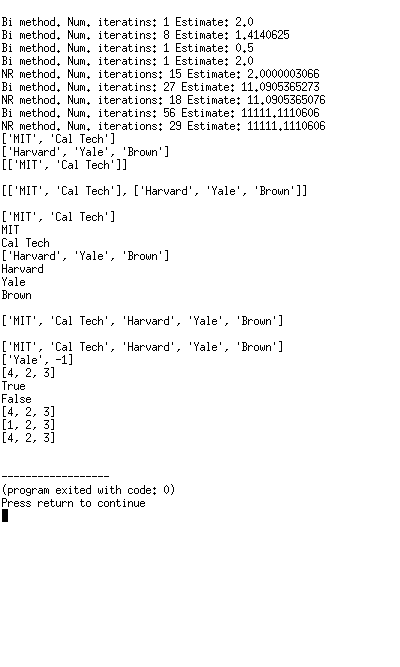
squareRootBi(9, 0.001)

squareRootBi(4, 0.001)

squareRootBi(2, 0.001)

squareRootBi(0.25, 0.001)

squareRootBi(4, 0.00001)
squareRootNR(4, 0.00001)

squareRootBi(123, 0.00001)
squareRootNR(123, 0.00001)

squareRootBi(123456789, 0.00001)
squareRootNR(123456789, 0.00001)

Techs = [‘MIT’, ‘Cal Tech’]
print Techs

Ivys = [‘Harvard’, ‘Yale’, ‘Brown’]
print Ivys
Univs = []
Univs.append(Techs)
print Univs
Univs.append(Ivys)
raw_input()
print Univs
raw_input()
for e in Univs:
    print e
    for c in e:
        print c
raw_input()
Univs = Techs + Ivys
print Univs
raw_input()
Ivys.remove(‘Harvard’)
print Univs
Ivys[1] = -1
print Ivys

L1 = [1, 2, 3]
L2 = L1
L1[0] = 4
print L2
def f(L):
    L[0] = 4
L1 = [1, 2, 3]
L2 = [1, 2, 3]
L3 = L1
print L1 == L2
f(L1)
print L1 == L2
print L1
print L2
print L3

L1 = [1, 2, 3]
L2 = L1[:]  # make a copy of L1

ORACLE – init script


#!/bin/bash
#
# Run-level Startup script for the Oracle Instance and Listener
#
# chkconfig: 345 91 19
# description: Startup/Shutdown Oracle listener and instance

ORA_HOME="/u01/app/oracle/product/9.2.0.1.0"
ORA_OWNR="oracle"

# if the executables do not exist -- display error

if [ ! -f $ORA_HOME/bin/dbstart -o ! -d $ORA_HOME ]
then
echo "Oracle startup: cannot start"
exit 1
fi

# depending on parameter -- startup, shutdown, restart
# of the instance and listener or usage display

case "$1" in
start)
# Oracle listener and instance startup
echo -n "Starting Oracle: "
su - $ORA_OWNR -c "$ORA_HOME/bin/lsnrctl start"
su - $ORA_OWNR -c $ORA_HOME/bin/dbstart
touch /var/lock/subsys/oracle
echo "OK"
;;
stop)
# Oracle listener and instance shutdown
echo -n "Shutdown Oracle: "
su - $ORA_OWNR -c "$ORA_HOME/bin/lsnrctl stop"
su - $ORA_OWNR -c $ORA_HOME/bin/dbshut
rm -f /var/lock/subsys/oracle
echo "OK"
;;
reload|restart)
$0 stop
$0 start
;;
*)
echo "Usage: $0 start|stop|restart|reload"
exit 1
esac
exit 0