bootp 설정법

 bootp란 호스트 PC에서 타겟 보드에 IP를 유동적으로 할당할 수 있는 프로토콜이다.

 네트워킹에 기본이 되는 IP를 먼저 할당함으로써 tftp, nfs, 웹 서버 포팅 등이 가능하게 된다.

 설치는 해당 rpm파일을 다운받은 후, 다음과 같이 입력하면 된다.

rpm -Uvh bootp-2.4.3-7.i386.rpm

 rpm이 성공적으로 설치가 완료되면 다음과 같은 설정파일을 생성해준다.

 /etc/bootptab

empos:
    ht=1:
    ha=0x000BA8000011:
    ip=192.168.10.165:
    sm=255.255.255.0

 /etc/xinetd.d/bootp

service bootps
{
    socket_type   = dgram
    flags              = REUSE NAMEINARGS
    protocol         = udp
    wait               = yes
    user               = root
    server            = /usr/sbin/bootpd
    server_args   = -s
    disable           = no
}

 그런다음 Bootloader에서 bootp 명령을 실행하면 된다.

 단, 이 명령을 시작하기전 호스트 PC와 타겟보드 사이에는 크로스 케이블로 연결이 되어있어야 한다.

처음에는 이를 알지못하여 한창 헤메었다….

Linux 시스템 백업과 복원

 KLDP 산책중 매우 유용한 글을 발견하여 이곳에 옮겨 싣는다.
 
 이곳에 옮긴 글은 본문 글에서 일부분을 간추려서 적은 글이다. 따라서 더 자세한 내용을 알고 싶다면 원문 링크를 따라가 보기를 바란다.

 웜본 링크 : http://kldp.org/node/84594

===========================================================

 내용의 요지는 간단하다. 시스템을 통째로 tar로 묶어버리되, 필요없는 부분(/proc, /media, /mnt /lost+found)은 배제한다는 것이다.

 시스템을 백업시 다음의 명령어를 입력한다.

sudo su

cd /

tar cvpzf backup.tgz –exclude=/proc –exclude=/lost+found
–exclude=/backup.tgz –exclude=/mnt –exclude=/media –exclude=/sys /

 시스템 복원시 다음의 명령어를 사용한다.

 backup.tgz는 루트디렉토리에 있어야 한다.

sudo su

tar xvpzf backup.tgz -C /

그러고 나서 압축시 제외했던 폴더는 따로 만들어 주면된다.

mkdir sys.

mkdir proc


mkdir lost+found


mkdir mnt


mkdir sys


mkdir media

etc…

=====================================

만약 압축하고 자시고 하는게 너무 귀찮다하시면 아래 방법을 쓰면 된다.
원본 시스템이 깔린 하드 A가 있고 그 시스템을 똑같이 복사할 하드 B가 있다고 하면
하드 B를 하드 A에 케이블로 연결을 해서 아래 명령어를 적용시키면 된다.

cat (하드A) > (하드B)

만약 하드 A 위치가 /dev/hdb이고 하드 B 위치가 /dev/hdc라면 다음처럼 하면 된다.

cat /dev/hdb > /dev/hdc

그러면 하드A의 내용이 하드B에 완전히 모조리 똑같이 백업된다. 당연히 시스템 디바이스 관련된것도
같이 가니까 사용할 컴터 스펙은 동일해야겠다.

Ubuntu Amarok error “Fingerprinting of .mp3 files is not supported”

 우분투에서 Amarok 사용시 발생한 에러이다.

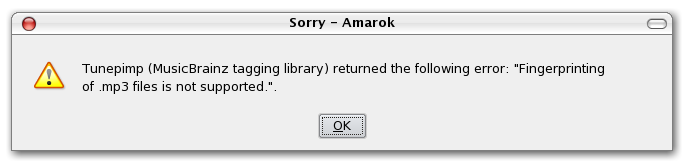
 Music Brainz를 사용하려 했더니 다음과 같은 에러가 발생했다.

“Fingerprinting of .mp3 files is not supported”

사용자 삽입 이미지
 이는 특정 패키지를 설치하지 않아서 생기는 에러이다.

 콘솔창에 다음과 같이 명령어를 입력하면 문제는 해결된다. : )

 sudo apt-get install libtunepimp5-mp3

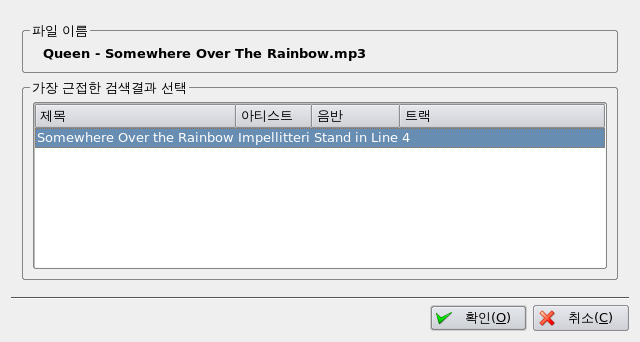
 이제 Amarok를 재시작한 후, Music Braiz를 사용해보자.

 아주 잘 될것이다. : )
사용자 삽입 이미지
 관련 링크 : http://www.howtogeek.com/howto/ubuntu/fix-amarok-error-fingerprinting-of-mp3-files-is-not-supported/

Ubuntu grub 복구 방법

 윈도우 설치 혹은 기타 다른 작업 중 grub이 날아가는 경우가 있다.

 이때, Live cd 를 이용하여 grub을 복구하는 방법을 소개한다.

 먼저 라이브 시디를 이용하여 부팅을 시도한다.

 그리고 터미널 창을 하나 생성한다.

 생성된 터미널에 다음과 같이 입력한다

sudo grub

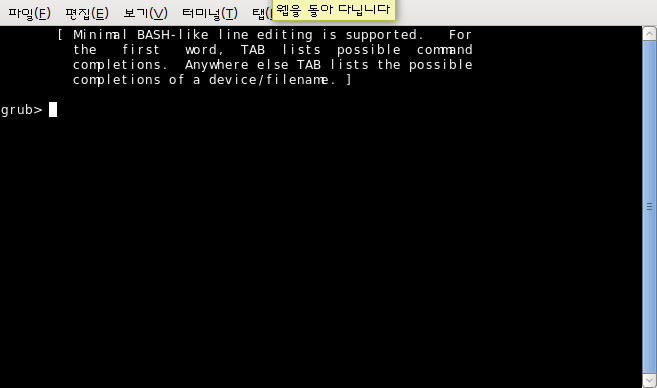
 다음과 같은 화면이 보일 것이다.
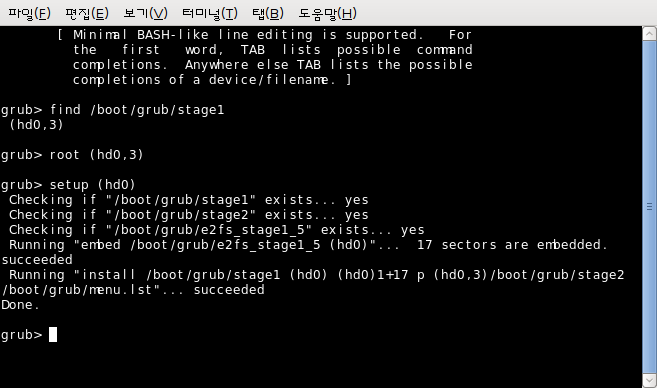
사용자 삽입 이미지
 그리고 다음의 명령어를 입력한다.

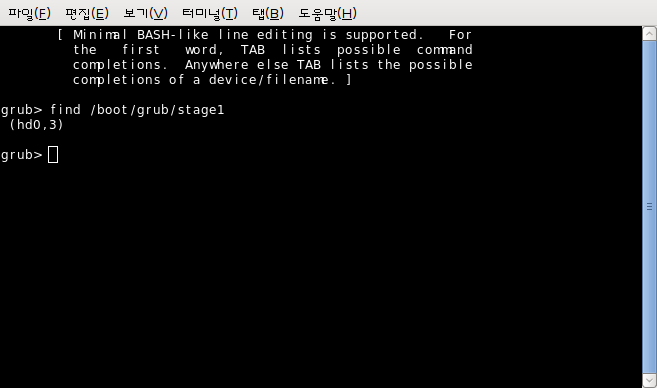
find /boot/grub/stage1

 입력 후 다음과 같은 메시지가 나올 것이다.
(hd?, ?)

 테스트에서는 다음과 같이 나왔다.
사용자 삽입 이미지
 확인된 (hd?,?)을 이용하여 다음과 같이 입력한다. (필자의 컴퓨터에서는 ‘root (hd0,3)’)

root (hd?,?)

 그리고 다음을 입력한다. (필자의 경우 ‘setup (hd0)’)

setup (hd?)


 그리고 quit를 입력하면 된다. 그리고 Live cd를 제거한 후 재부팅을 하면 grub이 보일 것이다.

quit


 아래 사진처럼 하면 된다. : )
사용자 삽입 이미지
 관련 링크 : http://ubuntuforums.org/showthread.php?t=224351&highlight=grub

NS Tutorial VII – Ping protocol 제작시 문제점

 NS Tutorial VII. A new protocol for ns 섹션을 그대로 따라하면 문제점이 발생한다.

 아마도…Tutorial을 쓴 시점이랑 지금의 ns2 버전이랑 맞지 않아서 생기는 문제인 것 같다.

 ping.cc 와 ping.h 을 나름대로 바꿔보았다.

 이름만 바꾸었고 나머지 부분은 모두 ping.cc, ping.h와 동일하다.

 주의해서 볼 부부은

hdr_ip* hdrip = hdr_ip::access(pkt);

hdr_pong* hdr = hdr_pong::access(pkt);

부분이다.

pong.h (Language : c)
  1.  
  2. #ifndef ns_pong_h
  3. #define ns_pong_h
  4.  
  5. #include “agent.h”
  6. #include “tclcl.h”
  7. #include “packet.h”
  8. #include “address.h”
  9. #include “ip.h”
  10.  
  11. // pong header의 구조를 선언
  12. // ret : 보내는 것(0)인지 받는 것(1)인지를 구분하기 위한 용도로 사용됨.
  13. // send_time : round-trip-time을 구하기 위한 용도로 사용됨.
  14. struct hdr_pong {
  15.     char ret;
  16.     double send_time;
  17.    
  18.     // Header acces methods
  19.     static int offset_; // required by PacketHeaderManager
  20.     // inline 함수는 처리 오버헤드를 거의 없애는 방법으로 사용됨.
  21.     // compile된 size는 커지지만 성능이 높아짐. 따라서 간단한 함수는 inline으로 정의하는 것이 효율적임
  22.     inline static int& offset() { return offset_; }
  23.     inline static hdr_pong* access(const Packet* p) {
  24.         return (hdr_pong*)p->access(offset_);
  25.     }
  26. };
  27.  
  28. // Agent를 상속받아 PongAgent 생성자와 사용될 메소드를 선언
  29. // PongAgnet() : 생성자
  30. // command() : sned일 때 사용되는 메소드
  31. // recv() : receive일 때 사용되는 메소드, 이것은 자동으로 호출됨
  32. // off_pong_ : pong header의 offset을 나타내기 위해 사용됨.
  33. class PongAgent : public Agent {
  34. public:
  35.     PongAgent();
  36.     int command(int argc, const char*const* argv);
  37.     void recv(Packet*, Handler*);
  38. };
  39.  
  40. #endif

pong.cc (Language : c)
  1.  
  2. #include “pong.h”
  3.  
  4. int hdr_pong::offset_;
  5.  
  6. // PacketHeaderClass를 상속받아 PongHeaderClass를 선언
  7. // 이미 많은 protocol header들이 PacketHeaderClass를 상속받아 정의되어 있다.
  8. // 동일한 방법으로 PacketHeader 아래에 Pong header를 둔다.
  9. // pong.h 에서 정의한 hdr_pong의 offset를 연결한다.
  10. static class PongHeaderClass : public PacketHeaderClass {
  11. public:
  12.     PongHeaderClass() : PacketHeaderClass(“PacketHeader/Pong”, sizeof(hdr_pong)) {
  13.         bind_offset(&hdr_pong::offset_);
  14.     }
  15. } class_ponghdr;
  16.  
  17. // TclClass를 상속받아 PongClass를 선언
  18. // Agent 하위에 Pong을 두기 위해 “Agent/Pong”을 지정
  19. // 이 부분은 tcl 파일을 작성할 때 “set p0 [new Agent/Pong]”와 같이 사용됨
  20. // PongAgent를 TclObject로 생성하여 반환
  21. static class PongClass : public TclClass {
  22. public:
  23.     PongClass() : TclClass(“Agent/Pong”) { }
  24.     TclObject* create(int, const char*const*) {
  25.         return (new PongAgent);
  26.     }
  27. } class_pong;
  28.  
  29. // PongAgent의 생성자를 구체적으로 정의하는 부분
  30. // 생성자에서는 C++과 Tcl을 바인드하도록 함.
  31. PongAgent::PongAgent() : Agent(PT_PONG) {
  32.     bind(“packetSize_”, &size_);
  33. }
  34.  
  35. // PongAgent의 command 메소드를 정의
  36. // 궁극적으로 이 부분은 pong packet을 send하는 부분이다.
  37. // Packet을 생성하고, pong header의 시작지점으로 이동하여,
  38. // ret를 0으로 설정하고, 시간을 설정한 다음, Packet을 전송한다.
  39. int PongAgent::command(int argc, const char*const* argv) {
  40.     if(argc == 2) {
  41.         if(strcmp(argv[1], “send”) == 0) {
  42.        
  43.             // 새로운 packet을 준비
  44.             // Creaqte a new packet
  45.             Packet* pkt = allocpkt();
  46.            
  47.             // packet의 pong header 시작 지점으로 이동
  48.             // Access the Pong header for the new packet
  49.             hdr_pong* hdr = hdr_pong::access(pkt);
  50.  
  51.             // pong header의 ret를 0으로 설정
  52.             // Set the ‘ret’ field to 0, so the receiving node
  53.             // knows that it to generate an echo packet
  54.             hdr->ret = 0;
  55.            
  56.             // pong header의 send time을 현재의 시간으로 설정
  57.             // Store the current time in the ‘send_time’ field
  58.             hdr->send_time = Scheduler::instance().clock();
  59.            
  60.             // 만들어진 packet을 전송
  61.             // Send the packet
  62.             send(pkt, 0);
  63.            
  64.             // Return TCL_OK, so the calling function knows that
  65.             // the command has been procoessed
  66.             return (TCL_OK);
  67.         }
  68.     }
  69.    
  70.     // If the command hasn’t been proceesed by PongAgent()::command,
  71.     // call the command() function for the base class
  72.     return (Agent::command(argc, argv));
  73. }
  74.  
  75. // PongAgent의 recv() 메소드를 정의
  76. // Pong Packet을 수신하였을 때 수행하는 부분을 정의
  77. void PongAgent::recv(Packet* pkt, Handler*) {
  78.     // ip header의 시작 지점으로 이동
  79.     // Access the IP header for the received packet
  80.     hdr_ip* hdrip = hdr_ip::access(pkt);
  81.    
  82.     // pong header의 시작 지점으로 이동
  83.     // Access the pong header for the received packet
  84.     hdr_pong* hdr = hdr_pong::access(pkt);
  85.    
  86.     // ret = 0 이면, 즉 처음 수신한 packet일 때 처리하는 부분
  87.     if(hdr->ret == 0) {
  88.         // packet에 있는 시간을 stime에 할당
  89.         double stime = hdr->send_time;
  90.        
  91.         // packet을 폐기
  92.         Packet::free(pkt);
  93.        
  94.         // 응답을 위한 packet을 생성
  95.         Packet* pktret = allocpkt();
  96.        
  97.         // packet의 pong header 시작지점으로 이동
  98.         hdr_pong* hdrret = hdr_pong::access(pktret);
  99.        
  100.         // packet의 ret를 1로 설정
  101.         hdrret->ret = 1;
  102.        
  103.         // packet의 send_time에 packet을 수신한 시간을 설정
  104.         hdrret->send_time = stime;
  105.        
  106.         // packet을 전송
  107.         send(pktret, 0);
  108.     } else {        // ret = 1 이면, 즉 보낸 packet이 다시 되돌아왔을 때 처리하는 부분
  109.         // 출력을 위한 변수 out을 선언
  110.         char out[100];
  111.        
  112.         // out 변수에 내용을 기록
  113.         // “이름(Agent/Pong) recv from(Source address) rtt(round-trip-time)”의 형태를 갖추어 기록
  114.         sprintf(out, “%s recv %d %3.1f”,
  115.        
  116.         // %s에 해당하는 부분(노드 이름)
  117.         name(),
  118.        
  119.         // %d에 해당하는 부분(노드 주소)
  120.         hdrip->src_.addr_ >> Address::instance().NodeShift_[1],
  121.        
  122.         // %3.1f에 해당하는 부분(응답시간)
  123.         // (현재시간 – send_time * 1000) –> round-trip-time
  124.         (Scheduler::instance().clock() – hdr->send_time) * 1000);
  125.        
  126.         // tcl instance를 생성
  127.         Tcl& tcl =Tcl::instance();
  128.        
  129.         // tcl instance로 out을 반환
  130.         tcl.eval(out);
  131.        
  132.         // packet을 폐기
  133.         Packet::free(pkt);
  134.     }
  135. }

 그리고 VII.3 Necessary changes 의

{ SRMEXT off_srm_ext_ }
{ Ping off_ping_ }} {
set cl PacketHeader/[lindex $pair 9]

 부분은 안해줘도 된다.

 해당 소스를 찾아보면 ‘tcl/lib/ns-packet.tcl’ 파일을 찾아보면

# XXX Old code. Do NOT delete for now. – Aug 30, 2000

라고 적혀있는 것을 볼 수 있다.

 즉, 건드리지 않는 것이 좋다. : )